Audio-driven image stylization
What does a sound look like?
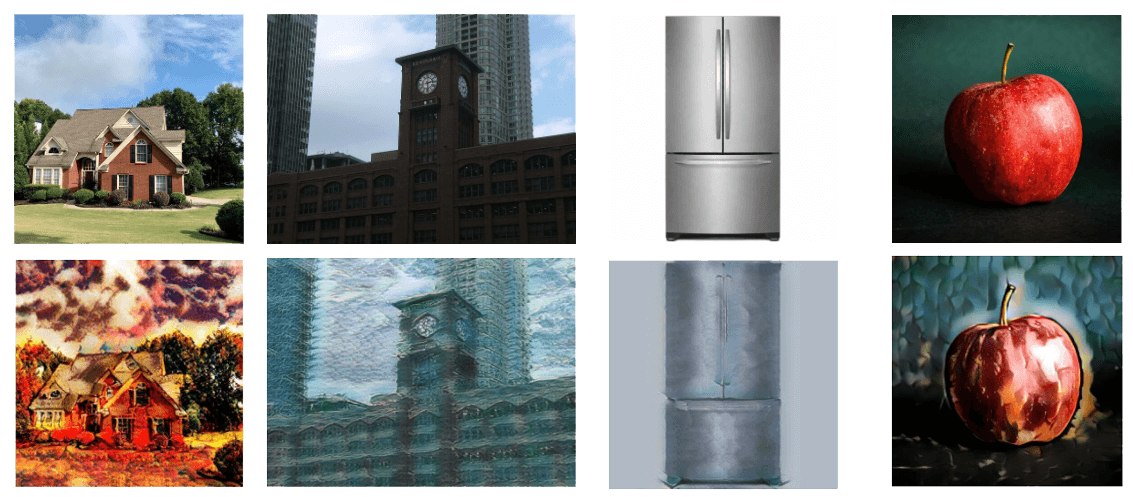
This project uses audio to guide the visual style of an image. A sound is converted into a style representation, which is then applied to an input image while keeping its original content recognizable.
Example results
The original images are on top and the stylized versions are below. Play the audio clip beneath each pair to hear which sound caused the stylization.
Volcano
Scuba
Snow
Funk / pop music
About the project
The project was part of my studies, where we explored whether audio could change the visual style of an image while preserving its content. Together with two fellow students, we generated a new dataset, trained a mapping network, and created a universal image stylization pipeline. The full source code and setup details are available in the GitHub repository.
The results indicate that the approach works well with environmental sounds because the dataset mostly contains styles with distinct patterns (water, wood, and stone). We also experimented with another dataset containing music clips and their music videos. However, these seem to be too arbitrary and not distinct enough to give proper results with this approach.
How it works
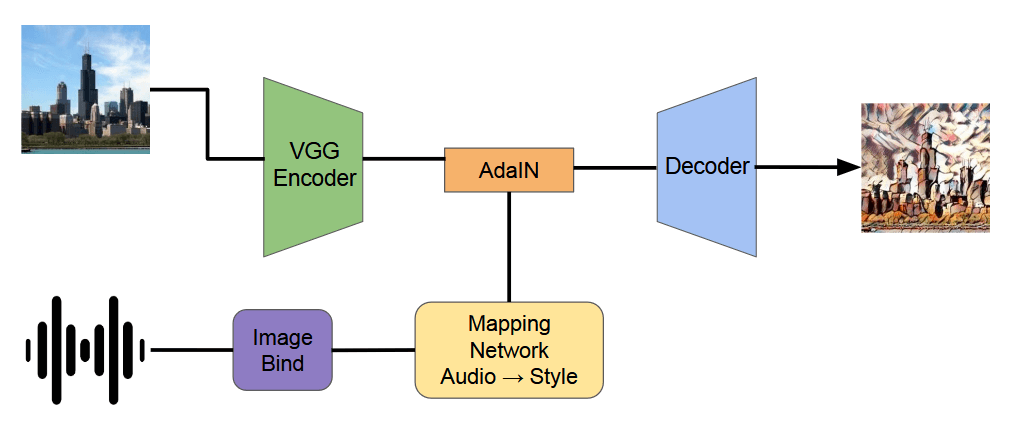
VGG encodes the input image to preserve its content. In parallel, ImageBind turns the audio clip into an embedding, and a trained mapping network translates that embedding into a visual style representation. Adaptive Instance Normalization (AdaIN) combines the image content with the audio-derived style and the decoder then produces the final stylized image.
The dataset was created by generating 10,000 image textures using Stable Diffusion 1.5 and matching them with a subset of 10,000 audio clips from the FSD50K audio dataset. We match them by calculating a multimodal similarity using the ImageBind model, which is also used in the final pipeline.